找到
20
篇与
小记
相关的结果
- 第 4 页
-
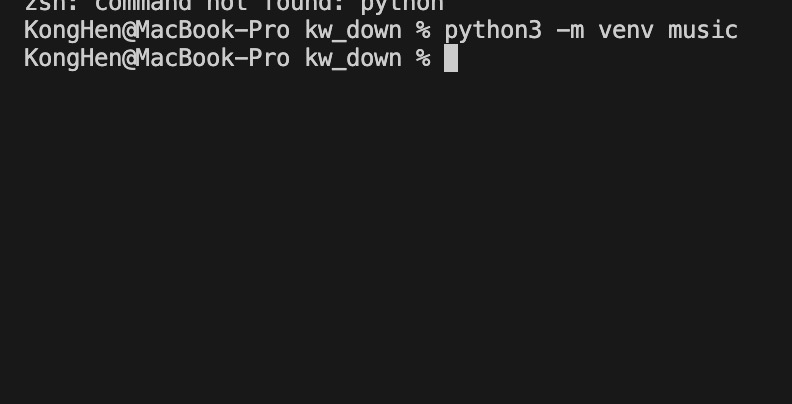
 使用pyinstaller打包python程序 准备内容 py程序文件main.py(以单文件为例) 程序图标favicon.ico(如果需要的话),可使用在线生成透明ICO图标生成。 python环境 创建虚拟环境 使用venv库(python3.3以后内置此库)创建虚拟环境 python3 -m venv music参数描述示例music虚拟环境名称,修改为自己的虚拟环境名称即可music# 示例 python3 -m venv music1.jpg图片 激活虚拟环境 # Mac source ./music/bin/activate # Windows .\music\scripts\activate2.jpg图片 安装pyinstaller pip install pyinstaller注意:安装pyinstaller,一定要在虚拟环境中安装,否则打包会丢失库,导致程序无法运行。 3.jpg图片 安装其他必须库 我编写的程序需要用到requests登其他库,所以需要安装,根据自己的程序按需安装即可。 编写程序 示例文件为main.py,并在虚拟环境并安装必须库。 4.jpg图片 测试运行 python3 main.py开始打包 pyinstaller --clean -F -i favicon.ico main.py参数描述示例--clean清理历史构建缓存--clean-F打包为单文件程序-F-i favicon.ico程序图标,如不需要删除即可-i favicon.icomain.pypython程序文件main.py输出以下内容表示打包成功 INFO: Building EXE from EXE-00.toc completed successfully.5.jpg图片 打包结果 打包结果程序位于dist目录下,与程序文件同名。 6.jpg图片 运行测试 7.jpg图片 退出虚拟环境 deactivate总结 pyinstaller需要安装的虚拟环境内,不能安装在全局 使用Mac只能打包为Mac程序,使用Windows只能打包Windows程序 参考 创建虚拟环境的四种方式(venv | pipenv | conda | poetry) Python pyinstaller打包exe最完整教程 pyinstaller 打包 提示 ModuleNotFoundError: No module named ‘xxx‘
-
UTS封装uni.request请求拦截器 UTS封装请求拦截器主要就是数据类型的问题 简单封装示例:每次请求在请求头中携带设备信息 export type RequestParams = { url: string; method: RequestMethod; data?: string; header?: UTSJSONObject; timeout?: number; sslVerify?: boolean; withCredentials?: boolean; firstIpv4?: boolean; } export type RequestRoot = { code: number; msg: string; data?: any } export type RequestRes = { data?: any; error?: string; } // 获取系统信息 export const getSystemInfo = (): string => { const system = uni.getSystemInfoSync() // 返回app信息,依次为appid,系统名称,系统版本,app版本,设备id,使用____分割 return system.appId + "____" + system.osName + "____" + system.osVersion + "____" + system.appVersionCode + "____" + system.deviceId } // 发送请求并携带设备信息 export const sendRequest = (options: RequestParams): Promise<RequestRes> => { let info = getSystemInfo(); let header = {} if (options.header != null) { header = UTSJSONObject.assign(options.header as UTSJSONObject, { app: info }) }else { header = UTSJSONObject.assign(header, { app: info }) } // 返回一个Promise return new Promise((resolve, reject) => { uni.request<RequestRoot>({ // ...options, // 展开其他请求配置 url: options.url, method: options.method, data: options.data ?? "", header: header, timeout: options.timeout ?? 6000, sslVerify: options.sslVerify ?? true, withCredentials: options.withCredentials ?? false, firstIpv4: options.firstIpv4 ?? false, success: (res) => { const data = res.data as RequestRoot if(data.code == 200) { // 在请求成功时解析Promise resolve({ data: data.data } as RequestRes) }else { uni.showToast({ title: data.msg, icon: "error" }) reject({ error: data['msg'] as string } as RequestRes) } }, fail: (err) => { uni.showToast({ title: err.errMsg, icon: "error" }) // 在请求失败时拒绝Promise reject({ error: err.errMsg as string } as RequestRes) } } as RequestOptions<any>); }); } 使用示例 // 导入封装的函数 import { sendRequest } from "@/common/request.uts" // 定义存储的变量 // 1. 数组 const list = ref<UTSJSONObject[]>([]) // 2. 对象 // const list = ref<UTSJSONObject>({}) // 请求示例:使用Promise的方式调用sendRequest函数 sendRequest({ url: 'https://api.example.com/data', method: 'GET' }).then(res => { // 处理请求成功的结果 list.value = res.data as UTSJSONObject[] // 数组,对应的存储数组的变量 // list.value = res.data as UTSJSONObject // 对象,对应的存储对象的变量 console.log('处理结果:', data.value); }).catch(err => { // 处理请求失败的情况 console.error('请求失败:', err); }) 在模板中使用示例 注意使用变量中数据的方法只能为下标[""]方法,.操作符不可以,会报错 <view v-for="item in noticeList" :key="item['id']"> <image mode="widthFix" :src="item['image']"></image> <view> <text>{{ item['title'] }}</text> <text>{{ item['sort'] }}</text> </view> </view>说明: 因为书写习惯原因,我自己的所有后端返回数据均为json,返回对象参数如下 参数描述示例code错误码200: 成功, 400: 失败, 或其他msg请求结果说明请求成功/请求失败等data请求返回的结果json数组/对象示例如下: data为数组 { code: 200, msg: "请求成功", data: [] } data为对象 { code: 200, msg: "请求成功", data: {} } 对应封装的请求中的自定义类型RootRes(request.uts文件中)
-
PHP封装功能较全CURL函数 经常用到,之前一直重复写,今天写脚本的时候就封装了一个,方便重复利用 <?php /** * httpRequest * 发送curl请求 * * @param string $url 请求的URL * @param string $method 请求方法,默认是'GET' * @param string $back 返回类型,默认为空,可以为'all'或'cookie' * @param array $params 请求参数,默认为空数组 * @param array $headers 请求头,默认为空数组 * @return array 响应数据 * */ function sendCurlRequest($url, $method = 'GET', $back = "", $params = [], $headers = []) { // 初始化cURL会话 $ch = curl_init(); // 设置请求URL if ($method == 'GET' && !empty($params)) { $url .= '?' . http_build_query($params); } curl_setopt($ch, CURLOPT_URL, $url); // 设置请求方法 if($method == 'POST') { curl_setopt($ch, CURLOPT_POST, true); curl_setopt($ch, CURLOPT_POSTFIELDS, http_build_query($params)); } // 返回而不是输出内容 curl_setopt($ch, CURLOPT_RETURNTRANSFER, true); // 允许跟随重定向 curl_setopt($ch, CURLOPT_FOLLOWLOCATION, true); // 设置返回类型 if ($back === "all") { // 设置为true以包含响应头 curl_setopt($ch, CURLOPT_HEADER, true); // 设置为false以包含响应体 curl_setopt($ch, CURLOPT_NOBODY, false); } elseif ($back === "cookie") { // 设置为true以包含响应头 curl_setopt($ch, CURLOPT_HEADER, true); } // 设置请求头 if (!empty($headers)) { curl_setopt($ch, CURLOPT_HTTPHEADER, $headers); } // 设置超时(可选) curl_setopt($ch, CURLOPT_TIMEOUT, 30); // 执行cURL会话 $response = curl_exec($ch); // 获取HTTP状态码 $httpCode = curl_getinfo($ch, CURLINFO_HTTP_CODE); // 获取错误信息 $error = curl_error($ch); // 处理cookie $cookies = []; if ($back == "cookie" || $back == "all") { // 分离头部和主体 $header_size = curl_getinfo($ch, CURLINFO_HEADER_SIZE); $header = substr($response, 0, $header_size); if ($back == "all") { $body = substr($response, $header_size); } // 解析头部中的Cookie preg_match_all('/^Set-Cookie:\s*([^;]*)/mi', $header, $matches); foreach ($matches[1] as $item) { parse_str($item, $cookie); $cookies = array_merge($cookies, $cookie); } } // 关闭cURL会话 curl_close($ch); // 构建返回数据 if ($error) { $data = ['code' => 400, 'msg' => $error]; } else if ($httpCode >= 400) { $data = ['code' => 400, 'msg' => "HTTP error $httpCode"]; } else if ($back == "all") { $data = ['code' => 200, 'cookie' => $cookies, 'body' => $body]; } else if ($back == "cookie") { $data = ['code' => 200, 'cookie' => $cookies]; } else { $data = ['code' => 200, 'body' => $response]; } // 返回响应数据 return $data; }
-
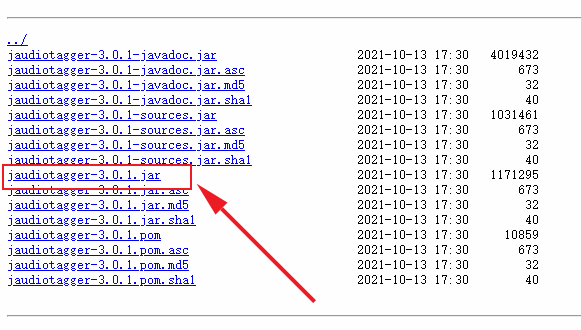
UTS引用原生jar包进行原生插件开发 也是踩了很多坑。主要的坑有两个,一个是引入jar包的问题,另一个就是jar包的使用问题(这个还得看包的文档 :@(吐血倒地) ) 下载jar包 我要用的是jaudiotagger包,引来实现对音乐标签信息的修改,包下载地址:https://central.sonatype.com/artifact/net.jthink/jaudiotagger/versions 我用的是最新的3.0.1版本,下载图中这个 lvkwkzpv.png图片 创建插件 下面是步骤: 创建插件参考官方教程步骤,这个很详细 地址: https://doc.dcloud.net.cn/uni-app-x/plugin/uts-plugin.html#%E5%88%9B%E5%BB%BAuts%E6%8F%92%E4%BB%B6 引入jar包 将你下载的jar包移动到libs目录下,如图 lvkwqa8k.png图片 导入包中的方法 java导入的方法 import org.jaudiotagger.audio.flac.FlacFile; import org.jaudiotagger.audio.generic.AudioFile; import org.jaudiotagger.audio.generic.AudioFileIO; import org.jaudiotagger.tag.FieldKey; import org.jaudiotagger.tag.Tag; import org.jaudiotagger.tag.images.Artwork;ts导入的方法 import FlacFile from "org.jaudiotagger.audio.flac.FlacFile"; import AudioFile from "org.jaudiotagger.audio.generic.AudioFile"; import AudioFileIO from "org.jaudiotagger.audio.generic.AudioFileIO"; import FieldKey from "org.jaudiotagger.tag.FieldKey"; import Tag from "org.jaudiotagger.tag.Tag"; import Artwork from "org.jaudiotagger.tag.images.Artwork";就这样导入就可以了,在Hbuilderx中,有代码提示,也可以不自己导入,写完代码,点击代码提示,又自动修复功能,当然,自动修复导入的不完全正确。 使用方法 测试的时候要打包自定义基座进行测试 使用的话,导入后就当ts方法写就行 有些报错是编译器bug不用管 // 引入java文件类 import File from "java.io.File"; import Files from "java.nio.file.Files"; // 引入jaudiotagger包 import AudioFile from "org.jaudiotagger.audio.AudioFile"; import AudioFileIO from "org.jaudiotagger.audio.AudioFileIO"; // import { Tag, FieldKey } from "org.jaudiotagger.tag"; import Tag from "org.jaudiotagger.tag.Tag"; import FieldKey from "org.jaudiotagger.tag.FieldKey"; // mp3封面相关 import StandardArtwork from "org.jaudiotagger.tag.images.StandardArtwork"; // falc封面相关 import FlacTag from "org.jaudiotagger.tag.flac.FlacTag"; import FileInputStream from "java.io.FileInputStream"; import PictureTypes from "org.jaudiotagger.tag.reference.PictureTypes"; /** * MusicInfo * 音乐信息类型 * */ type Tags = { audio: string; title: string; artist: string; album: string; cover: string; } export class KhMusicTag { /** * 私有变量 * tags { Tags } 标签信息 * action { boolean[] } 封面图片路径 * */ /** * writeMp3Tag * 写入mp3的封面图 * @param { string } cover 封面图路径 * * @returns { Boolean} 返回写入结果 */ public writeMp3Tag(info: Tags): boolean { try { // 读取音频文件 const audioFile = AudioFileIO.read(new File(info.audio)); const mp3Tag: Tag = audioFile.getTagOrCreateAndSetDefault(); // 设置歌曲名,歌手名,专辑名 mp3Tag.setField(FieldKey.TITLE, info.title); mp3Tag.setField(FieldKey.ARTIST, info.artist); mp3Tag.setField(FieldKey.ALBUM, info.album); // 创建封面图实例 const coverImage: File = new File(info.cover); // 创建Artwork对象 const artwork: StandardArtwork = new StandardArtwork(); artwork.setBinaryData(Files.readAllBytes(coverImage.toPath())); artwork.setMimeType("image/jpg"); // 根据实际封面图片类型设置 artwork.setPictureType(3); // 删除旧的封面图 mp3Tag.deleteArtworkField(); // 写入封面图 mp3Tag.setField(artwork); // 写回文件 audioFile.commit(); return true; } catch(e) { return false; } } /** * writeFlacCover * 写入flac的封面图 * @param { Tags } info 标签信息 * * @returns { Boolean} 返回写入结果 */ public writeFlacTag(info: Tags): boolean { try { // 读取flac文件,并强制申明为FlacTag类型 const audioFile = AudioFileIO.read(new File(info.audio)); const flacTag = audioFile.getTag() as FlacTag; // 设置歌曲名,歌flac手名,专辑名 flacTag.setField(FieldKey.TITLE, info.title); flacTag.setField(FieldKey.ARTIST, info.artist); flacTag.setField(FieldKey.ALBUM, info.album); // 读取封面图为字节流 const imageFile: FileInputStream = new FileInputStream(info.cover); const imagedata: ByteArray = new ByteArray(imageFile.available()); imageFile.read(imagedata); // 写入封面图 flacTag.setField(flacTag.createArtworkField(imagedata, PictureTypes.DEFAULT_ID, "image/jpg", "KHMD", 200, 200, 24, 0)); // 写回文件 audioFile.commit(); return true; } catch (e) { return false; } } }参考文献: 依据于开源的java库jaudiotagger 地址:https://bitbucket.org/ijabz/jaudiotagger/src/master/ 文档:http://jthink.net/jaudiotagger/index.jsp 成品jar包下载地址:https://central.sonatype.com/artifact/net.jthink/jaudiotagger/versions 说明:建议查看源码中的testsrc中的示例,个人觉得比文档中的示例详细和有用
-